계절을 담은 캔 한 컷 — 제품 광고 사진 만들기
list목차expand_more
예시 이미지
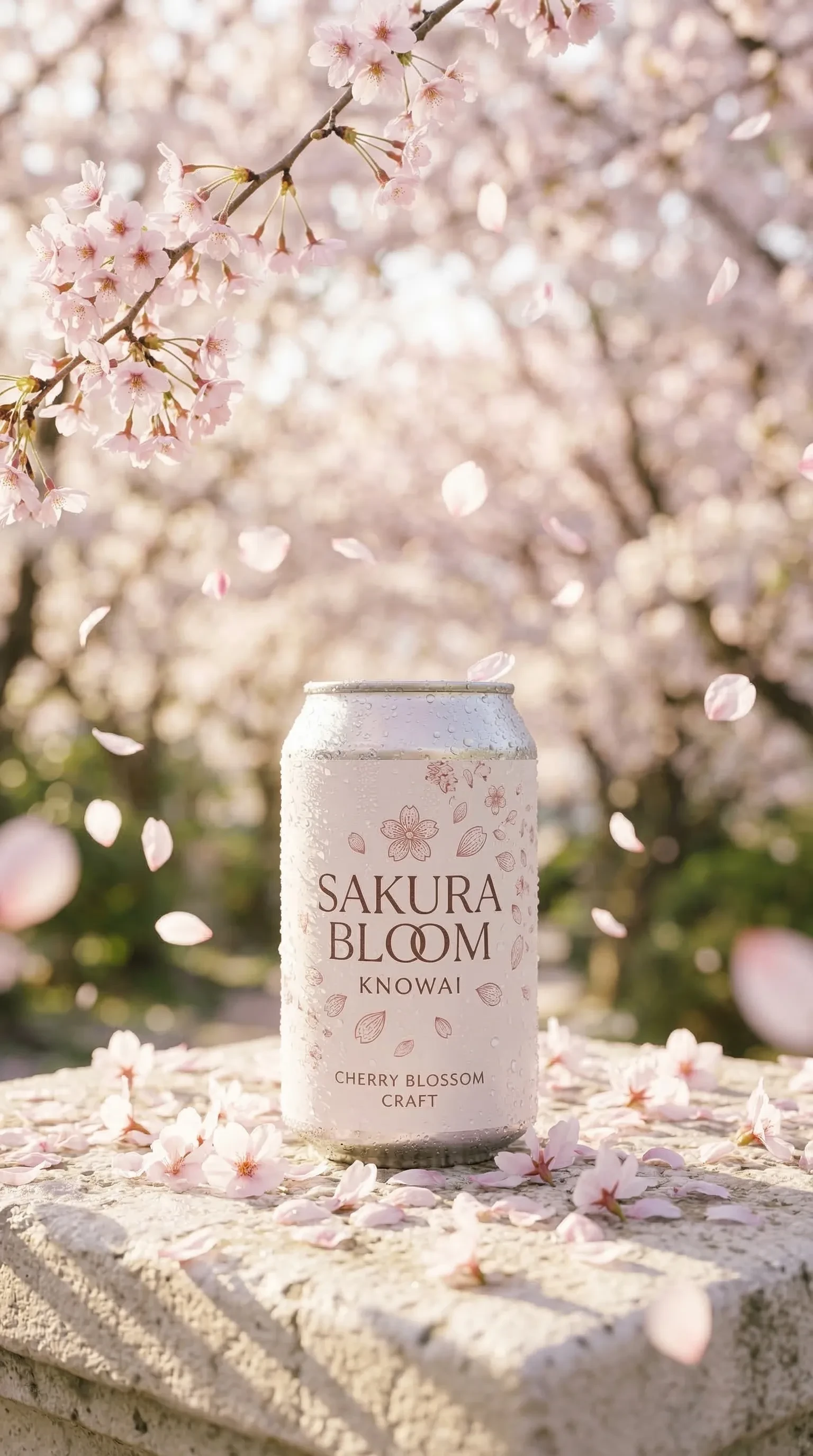
사용된 프롬프트
Commercial product photograph, Hasselblad medium format, 85mm macro lens, f/2.0.

A single condensation-beaded aluminum can — “SAKURA BLOOM KNOWAI” in delicate
serif typography with cherry blossom petal motifs — stands quietly on a weathered
pale stone surface, surrounded by naturally fallen cherry blossom petals.
Dozens of blush pink petals caught mid-air in a gentle spring breeze,
some in sharp focus close to the can, others softly blurred at varying depths.

Foreground: a carpet of fallen petals on cool stone, morning dew clinging
to each surface. A slender cherry blossom branch curves naturally into frame
from the upper left, heavy with clustered blooms.

Background: a sun-drenched Japanese garden, full-bloom sakura canopy forming
a soft tunnel of pink and white, pale golden morning light filtering through
the branches, everything dissolving into creamy bokeh.

Lighting: gentle low-angle morning sidelight, warm pale gold, casting long
soft shadows across the stone. Delicate rim light on the can edge.
No harsh contrast — diffused, airy, luminous.

Color grade: blush pink, ivory white, soft sage green, warm pale gold.
Ultra-sharp macro textures on petal surfaces and condensation droplets.
Photorealistic, serene and poetic spring atmosphere.
프롬프트 해설
이 프롬프트는 사진 촬영 지시서 형식으로 구성되어 있어요. 카메라·렌즈·피사체·배경·조명·색감 등을 실제 광고 사진처럼 각각 따로 지정하는 방식입니다.
-
Commercial product photograph, Hasselblad medium format, 85mm macro lens, f/2.0= “광고용 제품 사진, 핫셀블라드(광고 촬영에서 많이 사용되는 카메라), 85mm 매크로 렌즈, 조리개 f/2.0으로” → 고급 브랜드 느낌 + 앞뒤 보케 확보
-
condensation-beaded aluminum can= “캔 표면에 물방울(맺힘)이 맺힌 알루미늄 캔” → 시원하고 신선한 인상
-
“SAKURA BLOOM KNOWAI” in delicate serif typography with cherry blossom petal motifs= “섬세한 세리프 글꼴과 벚꽃 문양으로 로고/브랜드명 디자인”
-
weathered pale stone surface= “오래된 느낌의 옅은색 돌 바닥” → 자연스럽고 고즈넉한 질감
-
naturally fallen cherry blossom petals … caught mid-air in a gentle spring breeze= “자연스럽게 떨어진 벚꽃잎 + 봄바람에 공중에 흩날리는 꽃잎” → 동적인 생동감
-
some in sharp focus close to the can, others softly blurred at varying depths= “가까운 꽃잎은 선명하게, 먼 꽃잎은 거리별로 흐리게” → 깊이감 표현
-
slender cherry blossom branch curves naturally into frame from the upper left= “왼쪽 상단에서 가지 하나가 자연스럽게 프레임 안으로” → 구도의 자연스러운 프레이밍
-
sun-drenched Japanese garden, full-bloom sakura canopy forming a soft tunnel= “햇살 가득한 일본 정원, 만개한 벚꽃이 터널처럼” → 배경에 공간감과 분위기 부여
-
pale golden morning light filtering through the branches, everything dissolving into creamy bokeh= “나뭇가지 사이로 스며드는 이른 아침 햇살, 배경은 크리미한 보케로 녹아들게”
-
gentle low-angle morning sidelight, warm pale gold, casting long soft shadows= “낮은 각도의 부드러운 사이드 조명, 긴 그림자” → 드라마틱하지 않게, 아련하게
-
Delicate rim light on the can edge= “캔 테두리에 얇은 림라이트” → 캔의 형태를 배경에서 자연스럽게 분리
-
Color grade: blush pink, ivory white, soft sage green, warm pale gold= “색감 톤: 블러시 핑크·아이보리·세이지 그린·따뜻한 페일 골드” → 봄 분위기 통일
-
Ultra-sharp macro textures on petal surfaces and condensation droplets= “꽃잎 표면과 물방울은 초고해상도 매크로 질감으로”
프롬프트 작성이 막막하게 느껴진다면?
매번 처음부터 프롬프트를 작성하는 건 생각보다 손이 많이 가요. 카메라 설정, 조명, 색감, 배경까지 하나하나 채워 넣다 보면 꽤 긴 작업이 되기도 하죠.
사진 전용 프롬프트 생성 도구 Lumina Promputus를 활용하면, 원하는 분위기와 스타일을 선택하는 것만으로 완성도 높은 프롬프트를 자동으로 만들어줘요.
나만의 컷으로 바꾸는 법
1) 계절·무드 바꾸기
-
여름 — 정적인 연출 → 다이나믹 액션샷으로:
stands quietly on a weathered pale stone surface→explodes upward from a turquoise ocean splash, frozen at peak impact -
가을 — 자연 배경 → 생활감 있는 캠핑으로:
Japanese garden→lively autumn campsite with canvas tents, a crackling bonfire, strings of warm Edison bulb lights strung between birch trees -
겨울 — 야외 돌 바닥 → 실내 창가로:
weathered pale stone surface→snow-dusted wooden windowsill+ 배경을cozy living room glowing with Christmas fairy lights and fireplace로
2) 배경 깊이감 조절하기
-
단층 배경(현재): 단일 배경이 보케로 녹아드는 구성
-
이중 레이어 배경(겨울 스타일):
Background split into two layers — interior: cozy living room with Christmas lights / exterior (through frosted window glass): snow-covered garden at blue hour, cool blue bokeh→ 실내 온기와 야외 설경이 동시에
3) 조명 분위기 바꾸기
-
강한 역광 + 갓레이(여름 스타일):
gentle low-angle morning sidelight→intense warm backlight, god rays piercing through translucent water splashes, strong rim light on the can -
보조 광원 추가(가을 스타일): 조명 문장 뒤에
warm glow from the bonfire adding a secondary amber fill from the left추가 -
냉온 이중 조명(겨울 스타일):
primary warm amber from interior Christmas lights and fireplace+cool blue rim light from the snowy exterior through the window glass — warm and cold light meeting on the can surface in sharp contrast
4) 소품 추가하기
-
음식 소품(가을 스타일): 캔 옆에
a half-eaten spread of autumn harvest foods — roasted chestnuts, red apples, warm bread — casually placed beside the can추가 -
레비테이션 소품(여름 스타일):
Levitating around it: whole mangoes, precision-cut mango cubes, and crystal-clear ice fragments catching rim light→ 소품을 공중에 떠 있는 것처럼 연출 -
계절 자연 소품(겨울 스타일):
pine branches, deep red holly berries, weathered pine cones lightly dusted with real snow, cinnamon sticks and star anise casually resting nearby
5) 렌즈/카메라 바꿔보기
-
더 넓은 구도:
85mm macro lens→50mm lens(피사체+배경 균형 확보) -
팬 포커스(전체 선명):
f/2.0→f/11, pan focus, everything in sharp focus from foreground to background→ 배경까지 모두 선명하게
추가 예시